

Your Website Is Launched! Now, how do you keep it winning? (The Ultimate Maintenance Guide for Philippine Businesses)
So, you finally launched that sleek new website and let out the biggest sigh of relief, right?
We get it; you poured time, money, and soul into the process, working with a brilliant team for your web design Philippines project. Your site is fast, beautiful, and ready to take on the digital world… But here’s the honest, human truth: Your work isn’t actually over!
Think of your new digital home like a brand-new car you just drove off the lot. It doesn’t matter how great it is; if you skip the oil changes, ignore the check engine light, and never wash it, it’s going to break down eventually.
In the highly competitive digital landscape of the Philippines, ongoing maintenance isn’t just a chore; it’s the secret sauce that protects your investment, keeps hackers away, and ensures your pages consistently rank above your rivals on Google. Ready to find out exactly what needs doing? This article is your friendly roadmap to long-term success.
1. Why Ongoing Maintenance Matters for Your Philippine Website
Launching a site is a one-time expense, but maintenance is a recurring investment that pays for itself many times over. Neglecting it is not just risky; it’s digital sabotage.
The Risks of Neglecting Updates
Security Vulnerabilities
This is the biggest threat. Outdated software (CMS, themes, and plugins) is like leaving your digital doors unlocked. Hackers actively search for these loopholes, and a security breach can lead to lost customer data, a tarnished brand, and expensive, time-consuming recovery.
Slower Loading Speeds
Over time, databases get cluttered, images pile up, and old code slows things down. A slow website frustrates visitors, and, crucially, Google penalizes slow sites in search rankings.
Outdated Design & Functionality
Web standards change rapidly. What looked modern a year ago can look stale today. Your competitor just launched a stunning new design; if you don’t keep up, you’ll look behind the curve.
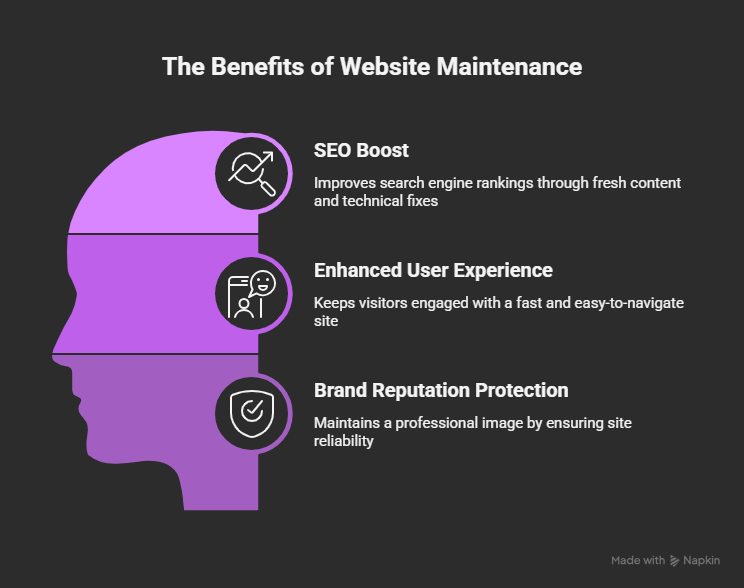
How Fresh Maintenance Supports Your Business Goals
Maintaining a well-oiled website directly supports your core business objectives:
Why It’s Especially Important for Businesses Operating in the Philippines
The Philippines has one of the highest rates of mobile internet usage in the world. This means:
- Speed is critical: users expect a lightning-fast experience even on mobile data connections. Optimized images and clean code (performance monitoring) are not optional; they are essential.
- Rapid Digital Expectations: Filipinos are early adopters of technology and new platforms. Your website needs continuous improvement to match these rapidly changing digital expectations and user habits.
2. Defining Your Post-Launch Maintenance Plan
A great web design Philippines service should include a transition plan to support. A proper maintenance plan is not a vague to-do list; it’s a structured workflow with scheduled tasks to keep the site in peak condition.
Components of a Proper Maintenance Plan
Your plan should cover these four essential areas:
- Backups & Security: Creating a safety net to recover from any disaster (hack, update failure, or human error).
- Software Updates: Keeping all the technology that runs your site (CMS, plugins, themes) patched and current.
- Performance Monitoring: Checking load times, mobile usability, and server health.
- Content Refresh & SEO: Updating information and running audits to ensure the site is always driving new traffic and conversions.
Suggested Schedule Framework
The frequency of your tasks depends on your site’s complexity, traffic volume, and content change rate. An e-commerce site needs more attention than a simple brochure site.
| Frequency | Small Brochure Site | Medium E-commerce Site |
| Weekly | Full Site Backup, Quick Security Scan. | Daily Full Site Backup, Daily Security Scans, Inventory Sync Check. |
| Monthly | All Software Updates, Broken Link Check, and Performance Test. | All Software Updates, Link Check, and Performance/Speed Optimization. |
| Quarterly | Content Audit, UX/Conversion Testing, Full Technical SEO Audit. | Content Audit, Comprehensive Funnel/Transaction Testing, Competitor Review. |
| Annually | Hosting/Domain/SSL Renewal Review, Full Design/Brand Health Check. | Platform/Server/Subscription Cost Review, Major Code Audit. |
3. Core Maintenance Areas & Tasks
This is your practical checklist for keeping your website secure, fast, and relevant.
Security & Software Updates
Your website is built on a foundation of software. When developers find vulnerabilities, they issue updates, and you must apply them quickly.
- Update Your Core: Update your Content Management System (CMS) like WordPress, your theme, and all plugins/extensions immediately when new versions are released.
- Secure the Perimeter: Ensure your SSL certificate is valid (for HTTPS), implement a Web Application Firewall (WAF), and use strong login protections (like two-factor authentication).
- Hosting, Server Health & Renewals: Monitor server resource usage and ensure your domain name and web hosting are set to auto-renew to avoid costly, embarrassing downtime.
Performance, Speed & Mobile Responsiveness
Speed is a major component of Google’s ranking algorithm, and your site’s speed is non-negotiable for a mobile-heavy audience.
- Test Load Times: Use tools like Google PageSpeed Insights or GTmetrix to regularly check your load times and identify bottlenecks.
- Clean Up & Optimize: Go through your media library. Clean up heavy images by compressing them and utilizing modern formats like WebP. Remove redundant scripts, unused CSS, and old plugins that bloat your site’s code.
- Mobile Walkthrough: Physically test your site on various smartphones (Android and iOS) to ensure all buttons and navigation elements work perfectly on smaller screens.
Content Updates & Design Refresh
Stagnant content tells Google your site is irrelevant. Dynamic content proves you’re an active authority.
- Content Audit: Review old blog posts, landing pages, and case studies. Update outdated statistics, remove irrelevant content, and refresh your product/service descriptions.
- Design and Brand Alignment: If your brand identity has evolved, or if current design trends (like sticky headers or video backgrounds) have become standard, schedule a small design refresh. For premium web design Philippines, the site must always look current and trustworthy.
Technical SEO & Link Health
This is the technical work that ensures search engines can properly read and index your site, maximizing your organic traffic potential.
- Fix Broken Links (404s): Use Google Search Console or a crawling tool to find internal and external broken links. These hurt both user experience and SEO. Fix the link or implement a 301 redirect.
- Monitor Crawl Errors: Regularly check Search Console for errors that prevent Google from crawling your pages.
- Track Key Metrics: Monitor indicators like bounce rate, mobile conversion rate, and page load time. A sudden drop in a metric is a warning sign that needs immediate attention.
User Experience (UX) & Conversion Optimisation
The ultimate goal of your website is to generate leads or sales. Maintenance must include testing the user journey.
- Test All Critical Flows: Don’t just check that your contact form exists; test it. Run a full transaction on your e-commerce site once a quarter. Test all Call-to-Action (CTA) buttons, signup forms, and checkout funnels.
- Solicit User Feedback: Use simple on-site surveys or session recording tools to see where users get confused or drop off. Use this data to iterate and improve the design.
4. Localized Tips for Philippine Brands
To effectively outrank the competition for the keyword “web design Philippines,” your maintenance strategy needs to go beyond global best practices and focus on the local environment.
- Local Hosting/CDN Advantage: If your primary audience is in Metro Manila, Cebu, or Davao, consider using a local web hosting provider or a Content Delivery Network (CDN) with a strong presence in Southeast Asia. This drastically cuts down on latency, directly improving speed for your customers.
- Local Payment Gateway Check: Ensure all local payment gateways (like PayMaya, GCash, or bank transfers) and shipping modules remain fully functional and compliant with local regulations.
- Mobile-First, Always: Because mobile usage is exceptionally high in the Philippines, a minor mobile rendering bug is a major problem. Every design refresh, update, and performance test must prioritize the smartphone experience.
The best web design agency Philippines will proactively include these local maintenance touches in their support packages they won’t just perform standard global build tasks.
5. When to Partner with an Agency for Ongoing Support
While a basic brochure site can be maintained in-house, most businesses eventually find that outsourcing to a professional web design and development team is more efficient and reliable.
Signs Your Internal Team May Be Overloaded:
- Frequent Patching Incidents: Your team is constantly rushing to fix urgent security issues rather than working on business growth.
- Slow Update Cycle: Updates are delayed for weeks or months, leaving your site vulnerable.
- Stagnant Performance Metrics: Your SEO ranking is dropping, and your load time keeps getting slower because no one has the dedicated time to perform optimization.
Benefits of Outsourcing Maintenance
| Benefit | Description |
| Predictable Budget | Instead of large, unpredictable bills for emergency fixes, you pay a fixed monthly retainer (often starting from ₱5,000 to ₱15,000 for basic support) to cover all routine tasks. |
| Expert Oversight | You get certified developers and SEO specialists monitoring your site 24/7, who know exactly how to fix conflicts and prevent future issues. |
| Quicker Response Times | Agencies offer guaranteed service level agreements (SLAs), meaning urgent fixes are applied within hours, not days. |
What to Look for in a Maintenance Partner
- Maintenance-Included Terms: Look for clear, detailed service contracts that define exactly what’s covered (security, updates, content edits, hours of support).
- Transparent Schedule: They should provide a written plan mirroring the tasks and schedules we discussed above.
- Local Philippine Support: A local partner will have a better understanding of the DTI registration requirements, local payment issues, and the high-speed demands of the Philippine internet infrastructure.
6. Budgeting & Scheduling Your Maintenance Workflow
Maintenance should be viewed as an operating expense, not a liability. As a reference, maintenance costs in the Philippines often range from
- Small Brochure Site: ₱5,000 to ₱10,000 per month (often covering basic backups and security).
- Medium E-commerce/Corporate Site: ₱15,000 to ₱50,000 per month (including dedicated developer hours, advanced security, and frequent content/SEO work).
A Simple Monthly Schedule Table
Use this as a starting point, adjusting for your site’s needs:
| Week | Key Task Focus | Sample Tasks |
| Week 1 | Security & Backups | Run a full site backup (off-site storage), run an advanced malware scan, and update all critical plugins/CMS. |
| Week 2 | Content & Link Health | Refresh 1-2 key blog posts or landing pages. Fix broken links and 404 errors. |
| Week 3 | Performance & Speed | Test site speed on PageSpeed Insights, optimize images, and clean up database tables. |
| Week 4 | SEO & Conversion | Review Google Analytics and Search Console for errors, test all forms/CTAs, and plan next month’s content. |
Tips to Track Progress
Set Key Performance Indicators (KPIs) and review them quarterly to ensure your maintenance is actually driving business value:
- Uptime: (Should be 99.9% or better)
- Load Time: (Aim for under 3 seconds on mobile)
- Bounce Rate: (Lower is better; aim to reduce it over time)
- Conversion Rate: (Ensure forms and transactions are increasing or stable)
7. Checklist: Your 12-Month Maintenance Calendar

Pro-Tip: Set automated reminders for these tasks and assign clear responsibilities whether that’s an in-house person or an external agency.
Conclusion
Your initial investment in a strong web design Philippines team built the house; maintenance keeps the roof on, the lights on, and the doors open for business 24/7. In the Philippines’ competitive and fast-moving digital market, maintaining your site is critical to extracting full value from that investment.
The key takeaway is simple: Stay active, stay secure, and stay fast.
Ready to keep your website working hard for you, driving traffic, and generating revenue?
Get the expert support you need with our Tech Support Plus IT Services today!
FAQ:
How often should I update my website?
You should update your website’s software (CMS, themes, and plugins) at least weekly to immediately patch security vulnerabilities. Content should be refreshed, and technical checks (links, speed) should be done monthly or quarterly, depending on your site’s size and traffic.
What is the cost of ongoing website maintenance in the Philippines?
The cost varies based on complexity:
- Small Brochure/Portfolio Site ₱5,000 to ₱10,000 per month.
- Medium E-commerce/Corporate Site ₱15,000 to ₱50,000 per month.
These costs cover expert security, updates, backups, and developer support.
Can I maintain my website myself, or should I hire an agency?
You can handle basic maintenance yourself (backups, simple content edits) if you have the time and technical skill. However, for security, performance optimization, and complex fixes (like theme conflicts or database issues), hiring a dedicated web design and development agency is highly recommended. It saves time and minimizes costly errors.
What happens if I don’t update my website after launch?
The two biggest risks are security breaches (leading to data loss or malware) and poor performance (slow loading times, broken features, and declining SEO rankings), which ultimately hurts your business’s revenue and reputation.
What should my first 30-day post-launch tasks be?
Your first 30 days should focus on monitoring and hardening:
- Set up automated daily backups.
- Monitor Google Analytics for unexpected traffic drops or spikes.
- Run a Full Security Scan.
- Fix any immediate crawl errors identified in Google Search Console.
- Test all forms and conversion points to ensure they are capturing leads correctly.