

Introduction
When you type a question into Google and scroll through a messy list of ten blue links, it can feel frustrating to open multiple tabs just to find a clear answer. We have all been there, and frankly, it is exhausting.
Imagine if Google acted less like a library card catalog and more like a smart research assistant who already organized everything for you. Well, you do not have to imagine anymore because that is exactly what the Google Web Guide is trying to do.
This new experimental feature is quietly reshaping how we search by using advanced AI to organize results into neat, helpful bundles instead of a long, messy list. If you own a website, run a blog, or manage a brand online, you need to sit up and pay attention. This is not just a fancy design update; it is a fundamental shift in how people find content on the web.
In this post, we are going to break down exactly what this feature is, how the magic behind it works, and most importantly, why it matters for your site’s future traffic.
What Is the Google Web Guide?
Let’s keep this simple. The Google Web Guide is an experimental feature found inside Google Search Labs that uses artificial intelligence to completely reorganize search result pages.
Think of the traditional Google search results page we have used for decades. It is a linear list. Rank 1 is at the top, Rank 10 is at the bottom. You scroll, you click, you hope for the best.
The Web Guide changes the game entirely. Instead of a ranked list, it uses a custom version of Google’s Gemini AI model to group web pages into distinct categories or “clusters” based on topics.
For example, if you search for “how to camp in the rain,” the standard Google page might just show you a mix of REI articles and random blogs. But with Google Web Guide turned on, the page transforms. You might see a section titled “Essential Gear” with links to waterproof tents, another section called “Safety Tips” about avoiding flash floods, and a third section on “Setting Up Camp” with step-by-step guides.
It is currently available via an opt-in on Search Labs, which is Google’s playground for testing new ideas. While it is still an experiment, it signals a massive move toward “AI-organized search results” that prioritize exploration and sub-topics over simple keyword matching.
How Web Guide Works (Simplified)
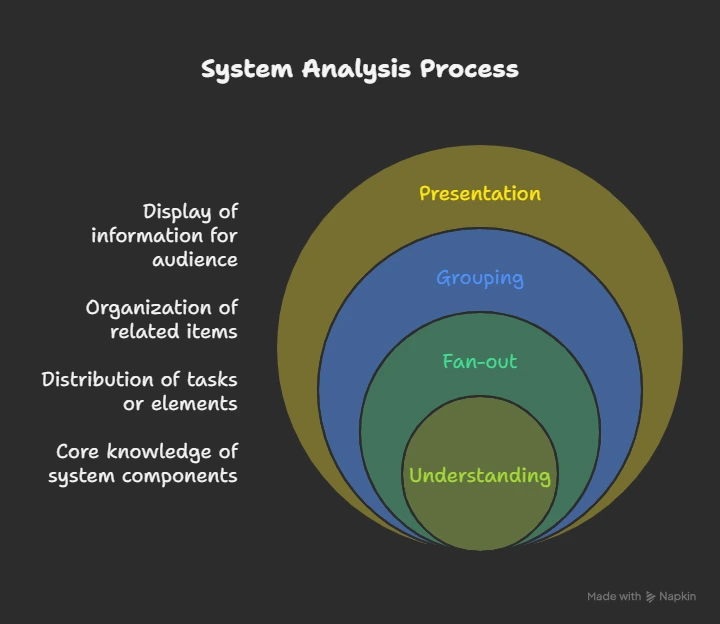
You might be wondering how Google knows how to group these things so perfectly. It is not magic; it is a smart technique called “query fan-out.”
Here is how it works in plain English:
The Breakdown
When you type a broad search like “best running shoes,” the AI doesn’t just look for those three words. It breaks your search down into multiple sub-questions instantly. It asks itself: Is the user looking for trail shoes? Road shoes? Budget options? Shoes for flat feet?
The Fan-Out
This is where the term “fan-out” comes in. The Google Web Guide runs all those little sub-searches simultaneously. It “fans out” your single request into five or six specific searches at the same time.
The Grouping
It gathers the best results for each of those sub-searches and bundles them together on your screen.
The Presentation
You get a clean interface with clear headings for each category. Under each heading, you see real links to real websites, often accompanied by a tiny AI-written summary telling you what that specific link covers.
It is important to clarify that this is different from those “AI Overviews” that just give you a wall of text generated by a robot. The Google Web Guide is still about sending traffic to websites. It just organizes those websites so the user can explore the topic faster.
The Fan-Out Process at a Glance
| Stage | Traditional Search | Google Web Guide Search |
| Input | “Plan a trip to Tokyo” | “Plan a trip to Tokyo” |
| Process | Matches keywords to pages | Breaks query into “Hotels,” “Food,” “Itinerary,” “Transport” |
| Result | List of 10 mixed links | Grouped sections for each sub-topic with specific links |
| User Goal | Click and hope | Explore specific interests immediately |
Why It Matters for Your Site
If you are sitting there thinking “I will just keep doing what I am doing,” you might want to reconsider. This shift impacts how your content gets seen. If Google is moving away from a simple list, your strategy needs to move with it.
Better Understanding of Google’s Interpretation of Queries
The biggest advantage for site owners right now is visibility into “search intent.” When you look at Google Web Guide results for your target keywords, you are seeing exactly how Google’s brain categorizes that topic.
If you run a food blog and search for “vegan dinner recipes,” and the Web Guide creates clusters for “High Protein,” “Under 30 Minutes,” and “Gluten-Free,” Google is literally telling you these are the most important sub-intents for that user. It is like a cheat sheet for what your audience actually wants.
Enhanced Content Strategy
This feature pushes us toward “topic clusters” rather than just chasing one big keyword. In the old days, you might write one giant 5,000-word guide and hope it ranks for everything.
With Google Web Guide, that giant guide might still work, but specialized content works even better. If you have distinct, high-quality pages that cover those specific sub-topics (like the “Under 30 Minutes” example above), your individual pages have a better chance of appearing in those specific clusters. It levels the playing field. You do not always have to be the #1 giant authority site to appear in a relevant sub-cluster.
Discover New Opportunities and Competitors
This new layout exposes competitors you might have missed. In a standard list, you usually only worry about the top 3 results. In the Google Web Guide, a competitor might own the “Budget Friendly” cluster while you own the “Luxury” cluster.
This helps you spot gaps. If you see a cluster appearing in the search results that you have zero content for, that is a golden opportunity to write something new and fill that gap.
Quick Tips for Site Owners (SEO Actionable)
So, how do you make sure your site thrives in this new AI-organized world? You do not need to be a coding wizard, but you do need to be strategic. Here are three solid ways to adapt.
Organize Content into Clear Topic Sections
Since Google Web Guide loves to group things, make it easy for the AI to understand your grouping.
- Audit your structure: Look at your blog. Is it just a random feed of posts? Start organizing them into clear categories.
- Use clear headings: Inside your articles, use descriptive H2 and H3 headers. Instead of a vague header like “More Info,” use “Benefits of Organic Soil for Tomatoes.” This helps the fan-out technology match your specific section to a user’s specific sub-query.
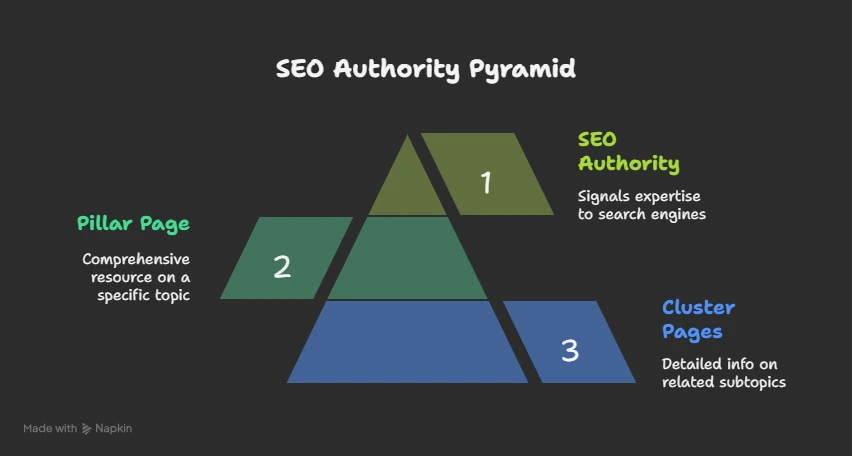
Create Content Clusters (The Hub and Spoke Model)
Don’t just write isolated articles. Build networks of content.
- The Pillar Page: Write one main overview page about a broad topic (e.g., “Complete Guide to SEO”).
- The Cluster Pages: Write 5-10 supporting articles that link back to that main page (e.g., “SEO for Beginners,” “Technical SEO,” “Link Building Strategies”).
- This structure screams “authority” to Google. It tells the algorithm that you cover the entire spectrum of a topic, increasing the odds that your links get picked up for various clusters in the Web Guide.
Deploy Structured Data and Internal Linking
We cannot ignore the technical side completely. You want to speak Google’s language.
Schema Markup
Use structured data (Schema) to clearly label your content. Tell Google explicitly, “This is a Recipe,” “This is a Review,” or “This is a FAQ.” The clearer you are, the easier it is for the AI to categorize you correctly.
Internal Links
Link your related pages together naturally. If you mention “blue widgets” in an article about “red widgets,” link them! This helps the AI bot crawl your site and understand the relationship between your different pieces of content.
Conclusion
The search landscape is changing faster than ever, and the Google Web Guide is a clear signal of where we are headed. We are moving away from the era of “ten blue links” and entering an era of hybrid search experiences where AI helps curate the journey.
This is not something to fear. In fact, it is exciting. It means that if you create genuinely helpful, well-organized content that solves specific problems, you have more ways to be found than ever before. You are no longer fighting for just one top spot; you are fighting for placement in specific, highly relevant topic clusters where your ideal audience is looking.
So, take a look at your website today. Are you answering the specific questions your users are asking? Is your content organized? If you start thinking less about “keywords” and more about “topics,” you will be ready for the Google Web Guide and whatever else Google throws at us next.
Is your website ready for the AI search era? Don’t get left behind, let Tech Support Plus IT Services help you optimize your strategy today!